
Topic
Topics are your work desk, used to handle ongoing tasks.
Imagine you're organizing a study room
- Topic = Work desk - Projects in progress, materials spread on the desk, discuss with assistant (AI) anytime
- Folder = Bookshelf - Books organized by category, take them out when needed
- Collection = Smart search - "Find all books about AI", automatically gathered from everywhere
In a topic:
- All blocks and conversations revolve around the same subject, maintaining the same context.
- AI can see all content within the topic.
One project, one topic. One idea, one topic.
Topic Features
Independent Workspace
Each topic is independent, like different work desks.
- Notes in different topics don't interfere with each other, keeping the context pure.
- Switching topics equals switching work environments; AI only sees the current topic's content.
Examples:
- "Product Design" topic - Contains product requirements, design drafts, discussion records.
- "Learning Notes" topic - Contains course notes, thoughts, summaries.
- "Project A" topic - Contains all materials related to the project.
Horizontal Column Layout
Notes in topics are arranged in columns, displaying thinking flow from left to right.
- Left to right ordering - Follows human viewing order; you can freely arrange content to organize overall thinking.
- Maximum 5 columns per screen - Maintains visual clarity without revealing too much information at once.
How to Use Topics
Create Topic
- Click the
New Topicbutton in the upper right corner to start adding notes and importing files. - You can also chat with AI directly on the main interface. When you start a conversation, Dessix will create a topic for you directly.
- Not sure if you need a topic? Hover over the
New Topicbutton, and aTemporary Chatbutton will appear below. You can chat with AI here without creating a new topic. When you think you need to create one, you can choose to convert this conversation to a topic.
Manage Topics
- Switch Topics - Click the topic list on the left to switch.
- Stash Notes - Put temporarily unused notes in the cache area. AI won't see them then, but you can pull them back into the topic anytime for AI to view.
- Organize Layout - Drag notes to adjust positions, moving the most important ones to the left for easier thought organization.
- Name Topic - Click the star button next to the topic title, and Dessix will generate a title for your current topic based on its content.
Topic vs Folder vs Collection
One-Sentence Distinction
- Topic = Working on - Tasks in progress
- Folder = Archived - Storage for completed content
- Collection = Searching - Automatically aggregated by rules
Detailed Comparison
| Topic | Folder | Collection | |
|---|---|---|---|
| Core Function | Workspace | Category Archive | Smart Filter |
| Content Source | Actively Added | Manually Organized | Auto-Matched |
| Content Change | Continuously Evolving | Remains Fixed | Dynamically Updated |
| AI Dialogue | ✅ Deep Dialogue | ❌ View Only | ❌ View Only |
| Typical Scenario | Writing papers, doing projects | Course material archive | "Last 7 days notes" |
Usage Recommendations
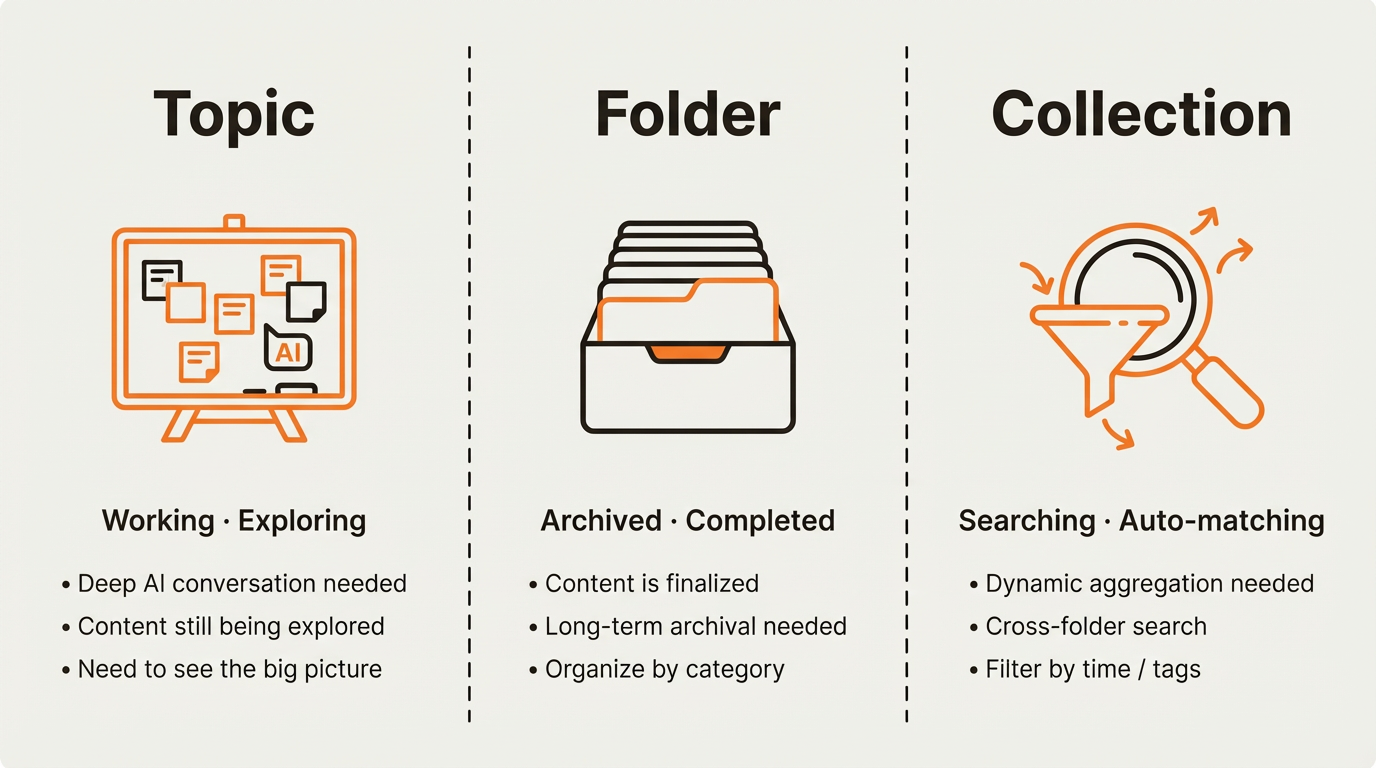
When to use Topics?
- Writing a quarterly review and need AI to help organize key points
- Just gathered competitor research and want to discuss it with AI
- Preparing a presentation and need to connect ideas across multiple notes
When to use Folders?
- Course is over — archive all materials under "2026 Spring Course"
- Project delivered — store all related documents for future reference
- Organize reading notes by book title for easy lookup
When to use Collections?
- Want to see "all notes created in the last 7 days"
- Need to find meeting notes scattered across different folders
- Filter everything tagged with "product strategy"